Read their day: the timeline and quiet days
By the end
You know what each line means, and what to do when things go quiet.
Your screen is meant to be read in ten seconds and then put down again. It shows the ordinary things that tell you they’re up and about, in plain words.
The timeline
Each line is something they did in Corasom:
- Checked in: they tapped I’m OK.
- Ticked off: a meal, a drink, a walk or their tablets, from their routine.
- Finished a puzzle: one of their six games.
- Their journal: how they said they’re feeling, and a few words if they added some.
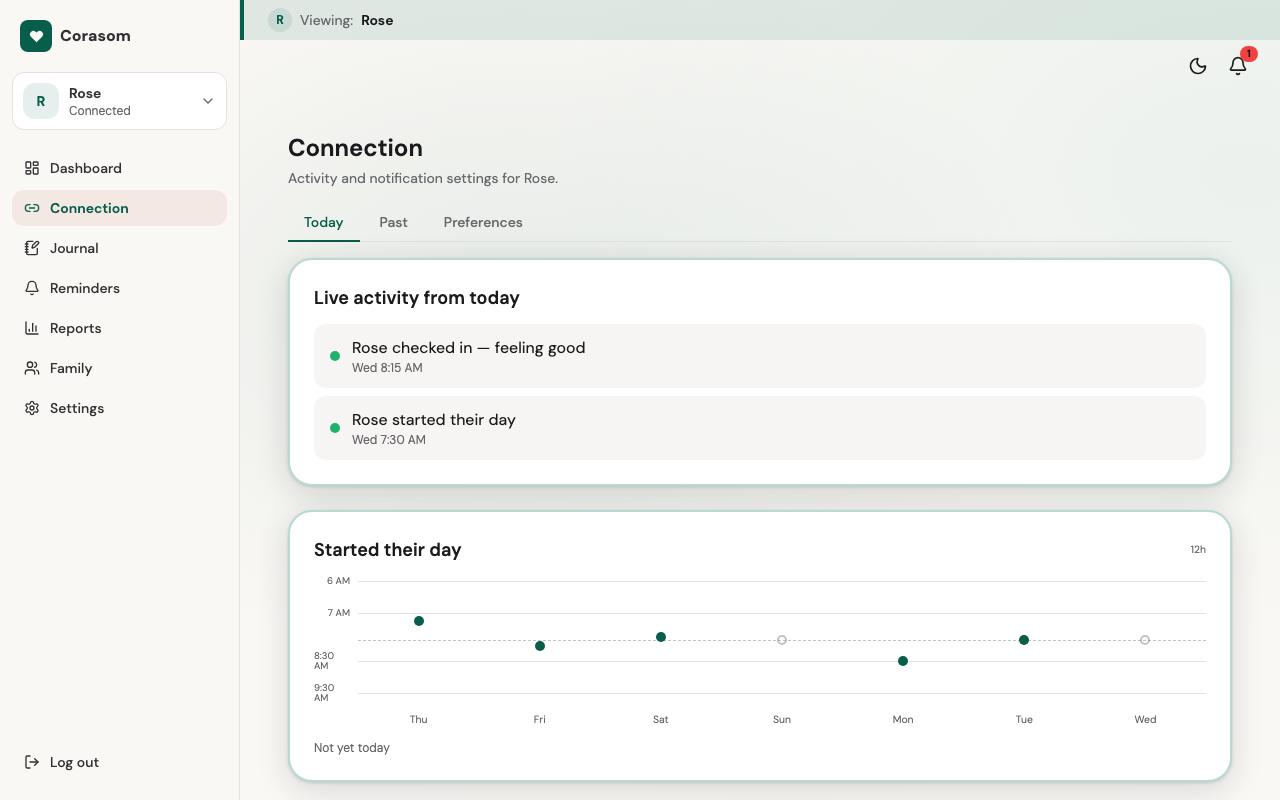
The timeline updates as things happen. If you’ve been busy, it fills in whatever you missed when you next look. How far back you can scroll depends on your plan. See Pricing.
What you won’t see
Where they are. Corasom has no maps and no location tracking. You see what they did in the app, never where they did it, and it never guesses whether they’re at home.
Quiet days
If they’ve been quiet, a card says so, once. There’s no stream of alerts to keep up with.
A quiet card isn’t an emergency. Often it just means they haven’t opened Corasom yet: a lie-in, a day out, a visitor. If it’s unusual for them, give them a ring.
Taking a break
They can pause sharing whenever they like. When they do, your screen says sharing is paused, so a quiet screen is never mistaken for something wrong. Only they can switch sharing back on.
Looking after two people
If you look after more than one person, use the switcher at the top of your dashboard’s menu.
Try it in the demo (opens in a new tab)
Last checked 14 October 2026 · Still stuck? Email [email protected] and a person will answer.